Freelance/Student £140
Members £115
*All tickets include a light lunch

More and more journalists are now using their smartphones as an electronic news gathering device as online magazines and newspapers increasingly expect reporters to add multimedia content to their story. This one-day course will teach you how to record audio and how to shoot video using your smartphone.
The workshop will cover the following:
- Learn how to record audio interviews and use a microphone to get the best sound
- Shoot video interviews and learn how to frame the subject correctly using well established cinematography techniques
- Film voxpops, point-of-view shots, action shots and film multiple interviewees
- Use your smartphone to film establishing shots and cutaway shots
- Learn how to use natural lighting as a key light to model and illuminate the subject
- Use good interview technique and learn how to edit for the sound
- Take photographs and learn how to use picture composition and rule of thirds
- Learn how to edit your clips on the smartphone and create a video news story
- Launch video news stories online and blogs using social media sites.
Before the course, we will contact participants to find out what type of smartphone they’ll bring to the course and with a list of apps to download before the workshop. The majority of these are free, but the list will include a couple of paid-for apps. These should not come to more that £20 in total.
About the trainer
Bill Shepherd is a production editor at The Guardian and The Observer newspapers. He is a member of the National Union of Journalists and a member of the Guild of Television Professionals.
Image: via Shutterstock / drpnncpptak
]]>Freelance/Student £125
Members £100
More and more journalists are now using their smartphones as an electronic news gathering device as online magazines and newspapers increasingly expect reporters to add multimedia content to their story. This one-day course will teach you how to record audio and how to shoot video using your smartphone.
The workshop will cover the following:
- Learn how to record audio interviews and use a microphone to get the best sound
- Shoot video interviews and learn how to frame the subject correctly using well established cinematography techniques
- Film voxpops, point-of-view shots, action shots and film multiple interviewees
- Use your smartphone to film establishing shots and cutaway shots
- Learn how to use natural lighting as a key light to model and illuminate the subject
- Use good interview technique and learn how to edit for the sound
- Take photographs and learn how to use picture composition and rule of thirds
- Learn how to edit your clips on the smartphone and create a video news story
- Launch video news stories online and blogs using social media sites.
Before the course, we will contact participants to find out what type of smartphone they’ll bring to the course and with a list of apps to download before the workshop. The majority of these are free, but the list will include a couple of paid-for apps. These should not come to more that £20 in total.
About the trainer
Bill Shepherd is a production editor at The Guardian and The Observer newspapers. He is a member of the National Union of Journalists and a member of the Guild of Television Cameramen.
Image: via Shutterstock / drpnncpptak
]]>Freelance/Student £125
Members £100
More and more journalists are now using their smartphones as an electronic news gathering device as online magazines and newspapers increasingly expect reporters to add multimedia content to their story. This one-day course will teach you how to record audio and how to shoot video using your smartphone.
The workshop will cover the following:
- Learn how to record audio interviews and use a microphone to get the best sound
- Shoot video interviews and learn how to frame the subject correctly using well established cinematography techniques
- Film voxpops, point-of-view shots, action shots and film multiple interviewees
- Use your smartphone to film establishing shots and cutaway shots
- Learn how to use natural lighting as a key light to model and illuminate the subject
- Use good interview technique and learn how to edit for the sound
- Take photographs and learn how to use picture composition and rule of thirds
- Learn how to edit your clips on the smartphone and create a video news story
- Launch video news stories online and blogs using social media sites.
This workshop is currently not compatible with Android devices.
It is specifically aimed at those using an iPhone or iPad, as iOS devices are currently more compatible with video and audio apps.
Before the course, we will contact participants with a list of apps to download before the workshop. The majority of these are free, but the list will include a couple of paid-for apps. These should not come to more that £20 in total.
About the trainer
Bill Shepherd is a production editor at The Guardian and The Observer newspapers. He is a member of the National Union of Journalists and a member of the Guild of Television Cameramen.
Image: via Shutterstock / drpnncpptak
]]>Freelance/Student £125
Members £100
More and more journalists are now using their smartphones as an electronic news gathering device as online magazines and newspapers increasingly expect reporters to add multimedia content to their story. This one-day course will teach you how to record audio and how to shoot video using your smartphone.
The workshop will cover the following:
- Learn how to record audio interviews and use a microphone to get the best sound
- Shoot video interviews and learn how to frame the subject correctly using well established cinematography techniques
- Film voxpops, point-of-view shots, action shots and film multiple interviewees
- Use your smartphone to film establishing shots and cutaway shots
- Learn how to use natural lighting as a key light to model and illuminate the subject
- Use good interview technique and learn how to edit for the sound
- Take photographs and learn how to use picture composition and rule of thirds
- Learn how to edit your clips on the smartphone and create a video news story
- Launch video news stories online and blogs using social media sites.
This workshop is currently not compatible with Android devices.
It is specifically aimed at those using an iPhone or iPad, as iOS devices are currently more compatible with video and audio apps.
Before the course, we will contact participants with a list of apps to download before the workshop. The majority of these are free, but the list will include a couple of paid-for apps. These should not come to more that £20 in total.
About the trainer
Bill Shepherd is a production editor at The Guardian and The Observer newspapers. He is a member of the National Union of Journalists and a member of the Guild of Television Cameramen.
Image: via Shutterstock / drpnncpptak
]]>Freelance/Student £125
Members £100
More and more journalists are now using their smartphones as an electronic news gathering device as online magazines and newspapers increasingly expect reporters to add multimedia content to their story. This one-day course will teach you how to record audio and how to shoot video using your smartphone.
The workshop will cover the following:
- Learn how to record audio interviews and use a microphone to get the best sound
- Shoot video interviews and learn how to frame the subject correctly using well established cinematography techniques
- Film voxpops, point-of-view shots, action shots and film multiple interviewees
- Use your smartphone to film establishing shots and cutaway shots
- Learn how to use natural lighting as a key light to model and illuminate the subject
- Use good interview technique and learn how to edit for the sound
- Take photographs and learn how to use picture composition and rule of thirds
- Learn how to edit your clips on the smartphone and create a video news story
- Launch video news stories online and blogs using social media sites.
This workshop is currently not compatible with Android devices.
It is specifically aimed at those using an iPhone or iPad, as iOS devices are currently more compatible with video and audio apps.
Before the course, we will contact participants with a list of apps to download before the workshop. The majority of these are free, but the list will include a couple of paid-for apps. These should not come to more that £20 in total.
About the trainer
Bill Shepherd is a production editor at The Guardian and The Observer newspapers. He is a member of the National Union of Journalists and a member of the Guild of Television Cameramen.
Image: via Shutterstock / drpnncpptak
]]>Freelance/Student £125
Members £100
More and more journalists are now using their smartphones as an electronic news gathering device as online magazines and newspapers increasingly expect reporters to add multimedia content to their story. This one-day course will teach you how to record audio and how to shoot video using your smartphone.
The workshop will cover the following:
- Learn how to record audio interviews and use a microphone to get the best sound
- Shoot video interviews and learn how to frame the subject correctly using well established cinematography techniques
- Film voxpops, point-of-view shots, action shots and film multiple interviewees
- Use your smartphone to film establishing shots and cutaway shots
- Learn how to use natural lighting as a key light to model and illuminate the subject
- Use good interview technique and learn how to edit for the sound
- Take photographs and learn how to use picture composition and rule of thirds
- Learn how to edit your clips on the smartphone and create a video news story
- Launch video news stories online and blogs using social media sites.
This workshop is currently not compatible with Android devices.
It is specifically aimed at those using an iPhone or iPad, as iOS devices are currently more compatible with video and audio apps.
Before the course, we will contact participants with a list of apps to download before the workshop. The majority of these are free, but the list will include a couple of paid-for apps. These should not come to more that £20 in total.
About the trainer
Bill Shepherd is a production editor at The Guardian and The Observer newspapers. He is a member of the National Union of Journalists and a member of the Guild of Television Cameramen.
Image: via Shutterstock / drpnncpptak
]]>Freelance/Student £125
Members £100

More and more journalists are now using their smartphones as an electronic news gathering device as online magazines and newspapers increasingly expect reporters to add multimedia content to their story. This one-day course will teach you how to record audio and how to shoot video using your smartphone.
The workshop will cover the following:
- Learn how to record audio interviews and use a microphone to get the best sound
- Shoot video interviews and learn how to frame the subject correctly using well established cinematography techniques
- Film voxpops, point-of-view shots, action shots and film multiple interviewees
- Use your smartphone to film establishing shots and cutaway shots
- Learn how to use natural lighting as a key light to model and illuminate the subject
- Use good interview technique and learn how to edit for the sound
- Take photographs and learn how to use picture composition and rule of thirds
- Learn how to edit your clips on the smartphone and create a video news story
- Launch video news stories online and blogs using social media sites.
This workshop is specifically aimed at those using an iPhone or iPad rather than an Android, as iOS devices are currently more compatible with video and audio apps. Before the course, we will contact participants with a list of apps to download before the workshop. The majority of these are free, but the list will include a couple of paid-for apps. These should not come to more that £20 in total.
About the trainer
Bill Shepherd is a production editor at The Guardian and The Observer newspapers. He is a member of the National Union of Journalists and a member of the Guild of Television Cameramen.
Image: via Shutterstock / drpnncpptak
]]> 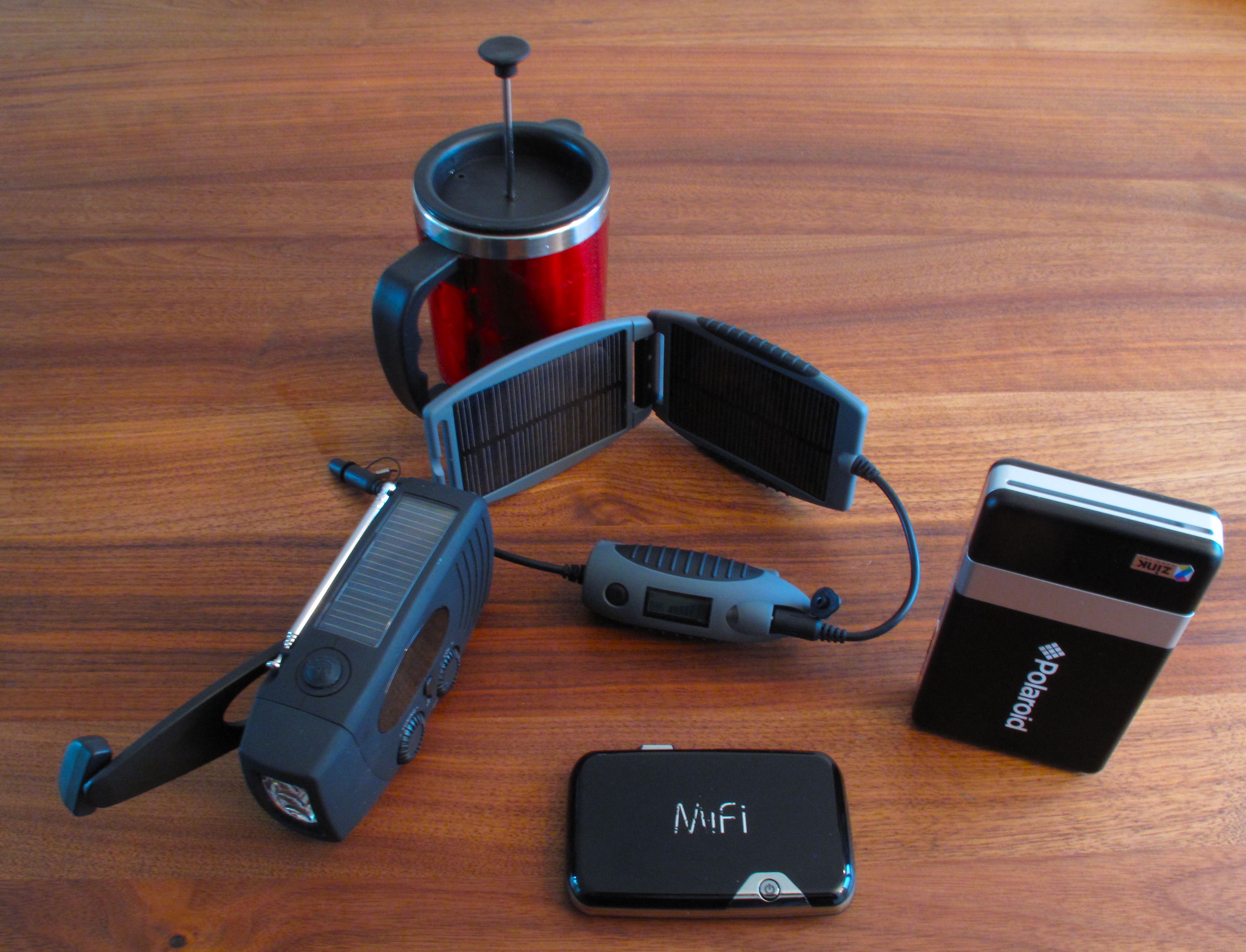
1. Novatel Mifi 2352 portable wireless hotspot
Stick in a SIM card to access a 3G network and start surfing the net via wifi. This little wonder lets you connect up to 5 devices by wifi. I gave the Mifi 2352 a good workout earlier this year in Iraqi Kurdistan using the Mobitel 3G network. It won a lot of praise my co-producers wanting to get online quickly. It turned literally anywhere we were into an instant internet cafe.
2. PowerMonkey eXplorer Solar Charger
Recharge on the run. Christian Payne aka @documentally has a good review of the PowerMonkey on his BushTech blog. It’s a practical device for recharging small devices. I often carry the battery pack to give my iPhone or Nokia a boost. The array of included adaptors makes this gadget quite versatile. Anyone using a Kodak pocket video camera such as a Zi8 might be interested to know that the battery pack will charge the camera battery (slowly) or work as an external power source. I have yet to test how long you can film using the PM on a full charge. As for the solar panels, I’m going to Mali shortly for a filming assignment so I’m keen to use the solar panels to help keep some small gadgets charged up.
3. Solar powered + wind up radio-torch + mobile phone charger
I love radio. I usually take quite a bulky Sony short-wave radio on my travels. But if I want to travel lighter and I know the BBC World Service is available locally on AM or FM then I usually opt for a small Walkman transistor set. But a couple of months ago a small all-in-one radio caught my attention. For 12 euro I thought it was worth giving a go and either it would do what it says on the tin or I’d give it away. No regrets. It’s quite rugged and is staying in the kit bag for the time being – perhaps a one-year after test would be useful to see how it holds up. The AM/FM radio works fine with loudspeaker or headphones. The LED torch is reasonably bright and fine for flapping around during power cuts (though I still carry a mini Maglite). The solar panel charges both the radio and torch. And as for the most interesting part of the unit – the wind-up crank handle – well I’m happy to report that it’s not a gimmick. After a couple of quick revolutions it begins charging not only the torch and radio, but via a short cable, just about anything accepting a 5 volt DC charge. Think mobile phone, iPhone and even a Mifi. Ok, it’s going to be an emergency situation that you need to charge your phone by a crank handle, but you never know… The one I bought in Germany was under the brand Moorhead. But I’ve noticed the same/similar model is sold under other brands elsewhere. It comes with several small adaptors for charging. I have a little bag for these adaptors (they’re all mixed up with the similar PowerMonkey adaptors) but I wish there was a little cubby hole in the unit to store the cable and the adaptor I would use the most. The unit can also be charged up by a USB port connected to a computer or another battery source.
4. Polaroid Pogo photo printer
The crowd pleaser. In combination with a mobile phone or digital camera via USB, the Polaroid Pogo is a pocket-sized photo printer. It really makes a difference if you’re working in a visual medium to be able to offer someone a photo on the spot – about the size of a business card. Result? Smiles all round. I used to cart around a small Canon printer that plugged into a car ciggie-lighter, but the Pogo is much more portable, powered by a rechargeable battery and there’s no mucking around with ink. However, keep in mind you can’t directly print with the iPhone – Apple has crippled the iPhone’s bluetooth for sending photo files. Nokia, no problem. It’s a pity really as it would be brilliant to use some iPhone photo editing apps such as PS Mobile in tandem with the Pogo.
5. Stainless steel coffee plunger
OK, perhaps the title of this post should of read four gadgets and one life saving utensil… but good coffee is technical. When an espresso machine is not within coo-ee, I’m certainly up for any local brew whether it’s a Turkish coffee, a glass of mint tea or chay with the teaspoon standing upright in a small mountain of sugar. But, I get irritable if I have to stare at a tin of instant coffee and consider the words freeze-dried. So if coffee is likely to be a problem on a trip I bring my own coffee and a portable plunger. Probably the best 10 euro I’ve spent on travel kit. The one pictured below is from Jack Wolfskin and it does the job for two cups. I’d like to find a slightly larger one for three cups – a "crew" model, then everyone is happy
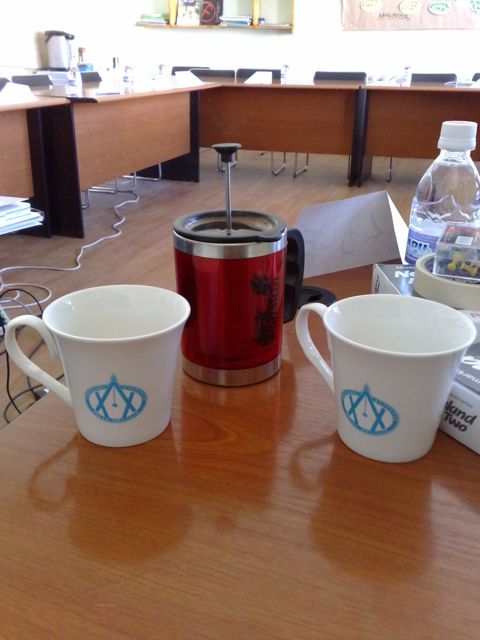
Coffee breaks at the Press Institute of Mongolia improved dramatically!
]]>
"News Quoyle, news. Better get your mojo working."
– Annie Proulx, The Shipping News
A draft of this post has been loitering in my documents folder for a while. But six months on from when I gave some mojo apps a workout in Nigeria and in Georgia I’ve got a few more points to share about what a mobile phone offers journalists for field reporting.
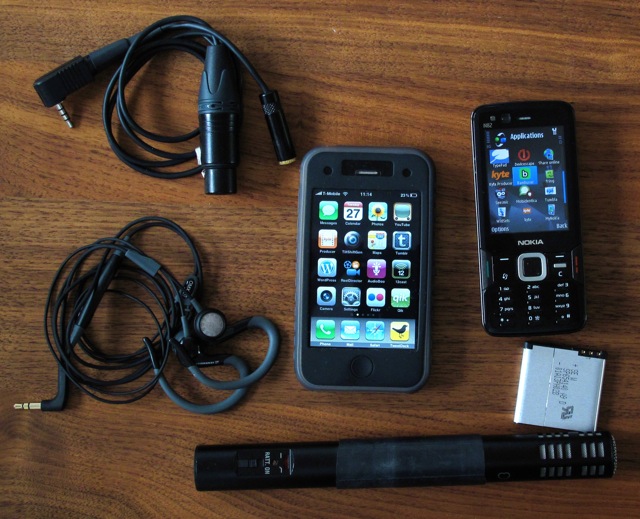
Maybe one of the reasons why I put this post on hold is that every other week a new app or gadget comes out that presents a tempting challenge for geeky inclined journalists to incorporate it into their kit and workflow. Trust me, once you’re hooked, it becomes an obsession – particularly if you have the chance to work with a decent smart phone.
So, I’ll try to balance this post with some general practical points on getting started and list a few apps worthy of consideration for reporting with a mobile phone.
Mojo skills
Most smart phones now offer connectivity to the internet over 3G and WIFI networks as well as a camera with a good lens and sensor for digital photographs and high quality video in a palm-sized tool. So, when it comes to skills, if you start looking towards borrowing and adapting some basics of broadcasting, online journalism, blogging, video journalism and photography, you’re going to be on the right track for working out how you want to best use a mobile phone for reporting and incorporating it into your workflow.
But as much as I get excited about new technology, new applications and gadgets, what I really want to do with all of this mobile tech goodness is to tell stories and engage with people.
I really hope reporting with a mobile phone helps to push the boundaries and styles of multimedia reporting and doesn’t simply end up replicating traditional radio and TV reporting.
I also think Andy Dickinson has some great training advice for newsrooms and journalists seeking to use new technology in their work – make time to play.
Whether it’s uploading photos and videos of my travels or tweeting about burning tacos in the kitchen, I know how my gadgets work and have developed a workflow that suits me by learning through playing. You’ll be more agile as a mobile journalist if you know your way around the tools and the technology. The last thing you want to do on a breaking story is to be learning how to use your phone on the run.
Social media apps and content sharing platforms
If your media organisation issues you with a smart phone and has innovative "Q" type tech boffins who have developed systems for you to upload your materials direct from the field with one push of a button, great – you’re lucky. But if you’re working independently, you’ll need to harness social media apps and platforms for sharing content that are free or low cost. So along with launching your own blog, some of these web and phone apps/clients would be a good starting point to explore.
Twitter (have a look at mobile apps/clients such as Tweetdeck,Tweetie, Twibble, Gravity and Dabr)
Friendfeed
Qik
Audioboo
Bambuser
YouTube
Blip.tv
TubeMogul
Kyte
Fring
Shozu
Flickr
Tumblr
posterous
12seconds
Twitpic
Yfrog
That’s only scratching the surface. For mobile blogging, many of the larger blog platforms also offer clients/applications to post content from a mobile phone and by email. And of course the Apple iTunes store offers an ever expanding galaxy of free and low cost iPhone apps that can be handy for mobile journalism.
Know your mojo phone
Read the manual. You’ve got to know your way around your phone’s settings. What’s the point in having a smart phone if you can’t change for example the access point settings to log onto wifi or 3G services?
Make a mojo plan
OK it might be tempting to just head on out and unleash your mojo-ninja-self on the world. But what are you really trying to do? What are your mobile reporting objectives? What materials do you need to file from the field with your mobile phone? Consider the conditions you’ll encounter. Will you have good wifi or 3G access? What will you do if the 3G network is a little slow? A little bit of planning can save a lot of flapping around.
Where is your mojo content going?
Most mobile phone clients/apps will offer plenty of ways for you to integrate photos, audio and video with social media services such as Twitter or with a blog. So, have a think about where you want your media to go. Check out the share and network functions on whatever application you use. Make a test before you head out to report. Do you want to be selective or do you want your content to be everywhere at once? Keep track of where you are crossposting material. (That may need a pen and paper!)
A one push application such as Shozu can distribute or crosspost your content to numerous social media and blogging platforms. Likewise posterous makes it dead easy to post any content by email.
And don’t forget about harnessing RSS feeds from any of the social media platforms you use. For example, widgets are easy to build from RSS feeds. You can aggregate your live stream feeds and embed a widget into your blog.
Photographs
The quality of images produced by mobile phones is continuing to improve. For the past 18 months I’ve used a Nokia N82 that has a 5 megapixel camera. It’s fantastic to have a decent camera with me everywhere I go. Same goes for the iPhone 3GS. It only sports a 3 megapixel camera, but it’s more than adequate for photos in good lighting conditions.
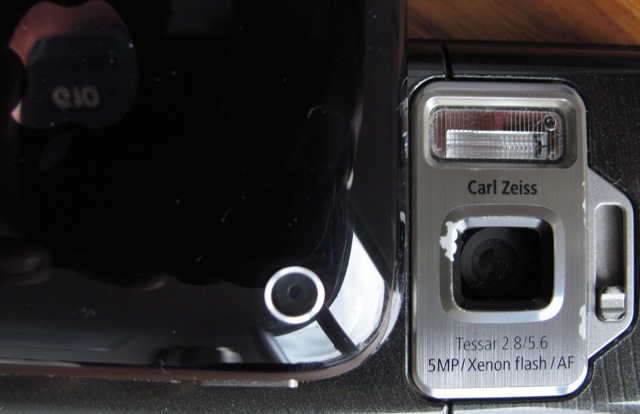
No matter how good the camera is in your phone, yo
u’ll only produce good photos if you know the basics of photography. I cringe every time I hear about reporters handed a camera without any training and asked to "take a few pics for an online story".
If you’re a beginner, a basic digital photography course is going to make a huge difference in the range of photos you will produce. And to build upon those new skills you need to get snap happy and take photos everyday.
The camera in the phone may also have some unexpected yet useful features. Who would have thought that Nokia would include a time-lapse function in the Sequence mode? Certain situations may let you set up the phone to capture photos, video or audio while you go off somewhere else to gather more material with another device. In Nigeria I set up my phone in a hospital operating theatre to capture a time-lapse sequence while I interviewed patients outside with a audio flash recorder.
Video
Similarly to photos, the video quality of camera phones is constantly improving. Samsung’s Omnia HD offers… yep, HD video.
If you’re new to video think about doing an introductory video camera course and turn to the skills and techniques of video journalists. It will surely whet your appetite for video blogging and/or using camcorders and pocket camcorders such as the Flip, Kodak Zi8 or iPod Nano, or even the video function on a compact digital camera.
As for live streaming video from a mobile phone, that’s great when there’s action or for an interview, but try to think before shooting and avoid ‘hosing the garden’ with the camera. I think less is always more. If you have time, look around for interesting angles – plan your shoot or interview. Think about how your video and accompanying title and/or tweet can tell a story.
It’s difficult to avoid camera shake with small camera phones, but if you require better quality video use a small tripod with an adapter to hold a mobile phone. You can even build your own tripod for an iPhone.
Cut through – set a title and description
Sounds simple but setting a title, description and #hashtag will help the material you upload or live stream to cut through the noise when you crosspost to a platform such as Twitter. It’s easy to forget when you’re on the run. If I’m planning to stream live video I usually set a generic title just in case I have to start filming quickly.
Audio
Radio journalists have long made use of the mobile phone to report live from the field or for filing reports. Apps such as Audioboo now offer journalists a powerful audio recording tool – produce an interview or report and publish it direct to the net with a photo. Along with interviews, I like making use of mobile audio applications when I’m moving between places. During the April demonstrations in Tbilisi I used Utterli. You can walk and talk and offer your audience updates while you’re on the move. And if you’re new to radio/audio, don’t forget it is a "visual" medium too. Describe what you see and paint a picture for your audience.
Producing better audio
If you’re using an iPhone, then straight away you have an advantage over many smart phones. The audio captured by the iPhone’s internal microphone (and even the native Apple Voice Memo app) is surprisingly good.
The internal mic on a Nokia is not particularly good. Moreover, I find the audio recordings using the Nokia Voice Recorder app to be far from adequate and produce a really thin, tinny sound. If you use a S60 Nokia and need better sound I’d recommend downloading a free trial version of the Alon MP3 Dictaphone application. It offers a several settings to record in mp3 and WAV. Unfortunately the send function in Alon does not offer email, but if you locate the file via Nokia’s File Manager function you can email the file.
But no matter what smart phone you’re using, audio will be improved using a good external microphone.
Reuters teamed up with Nokia for a mojo project that used an external mic with the Nokia N95. If you’re into a little DIY hacking you can quite easily adapt the TV-Out cable that comes with a Nokia for an external mic. For the iPhone there are several plug-in mini external mics available too.
(No sales pitch here, but you’ll note in the photo of my kit above that I use a bespoke external mic cable that I’ve tested with Jesse Versloot of uwkabelopmaat to suit Nokia and the iPhone. Early days, but results are encouraging so far.)
Editing in the field
An audio editing application called Poddio is available for the iPhone. It’s an app that seemed to get a good rap at this year’s NAB. I’ve yet to try it. Since the middle of this year the price shot up from US$29.99 to US$149.99! Perhaps the developers might consider offering a trial version or lighter version? (Thanks to Stephen Quinn for pointing me to Poddio.) I can’t wait till someone develops Audacity for the iPhone.
Basic video editing on a mobile phone has also arrived. The Samsung Omnia includes a Video Editor system and the iPhone can now make use of the ReelDirector application (screenshot below).
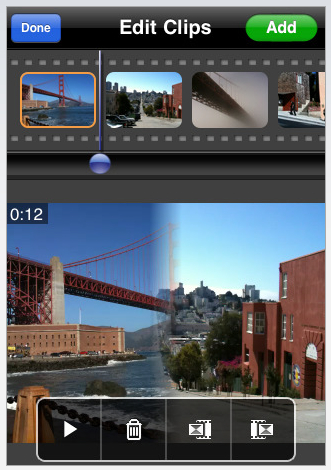
ReelDirector has a straightforward timeline that lets you move clips around and offers a range of shot transitions. I had some fun filming simple shots and sequences on a day trip in Georgia this month and afterwards edited a short video on my iPhone in a Chinese restaurant. It has field reporting potential but you’ll need to plan carefully. Keep in mind, a video over say three minutes will leave you nudging 100MB. That’s a big file to move from a mobile phone and might leave you needing a mobile FTP solution… not too mention looking for more power. I’m also very keen to get my hands on the Samsung Omnia to explore its video editing features.
And photo editing is also going mobile with applications such as Best Camera and TiltShiftGen. Best Camera gives a mobile phone photographer several preset filters that you can apply directly to a photo. TiltShiftGen lets you go toy-town crazy to get the tilt-shift effect.

But I’ve really fallen for this iPhone app because it not only provides filters, but each filter se
tting is adjustable. I love being able to adjust saturation, brightness and contrast on the fly in a mobile phone. Both of these apps let you email your photos or post to Twitter and Twitter photo sharing clients such as Twitpic.
Location, Location
Geo-tagging the content you produce and upload from a mobile phone can be really useful for mapping a story. If several field reporters covering the same event begin geo-tagging content, a map can become one the core ways of telling the story. Check out the GPS and map/location services on your phone and applications such as Flickr and Qik. Did someone say… Ushahidi?
Mobile partner in the field
I think working with a mobile phone and having access to the net and apps such as Twitter is like having a tech partner in the field. As a freelancer I don’t feel like I’m working on my own anymore. My initial view of Twitter was that it was a handy micro-blog tool to complement my blog and way to let a lot of people know where I am (just in case of….) But that’s changed. I’m now communicating with friends, contacts and whoever else is interested in my story as I’m working. Even a basic Twitter search can be useful for real-time updates, but having access to extra filters via Twitterfall can make Twitter a more polished source of information – allowing you to pull in information that is more relevant to what you’re working on.
More mojo power?
As a minimum I carry a second battery and a small 5 euro AA battery charger. Looking for more charging ideas? Christian Payne aka @documentally has posted an excellent video covering loads of mobile power charging gadgets.
Need more mojo ideas?
In this post, I’ve only concentrated on capturing, producing and filing material with a mobile phone.
Mobile journalism is obviously much broader when you add what you can produce with netbooks, laptops, 3G dongles, Eyefi cards, sat phones and whatever other hand held digital devices you want to mention. You’re only limited by the imagination. There are plenty of people exploring mobile journalism and here are a few projects/blogs to check out.
– Alex Wood and the Berlin Project team will cover the anniversary of the fall of the Berlin Wall on November 9. I’m very interested to see how they’ll build upon their mobile coverage during the G20 demonstrations.
– ARD journalists in Germany recently produced an innovative mojo reporting project during the general election. Check out Marcus Boesch’s post (German) on his experience using an iPhone 3GS to blog and report. Marcus has made some recent tests using Skype for video interviews (Two-way video interviews via Qik or Bambuser are next Marcus!)
– Stephen Quinn is a journalist and lecturer at Deakin University in Australia and has an excellent blog Global Mojo. I’m told that Stephen’s e-book on mobile journalism will be available soon.
– Paul Bradshaw has also posted a series of video talks on his blog discussing mobile journalism and he has produced a list on what a mobile journalist needs. Great stuff.
– Frank Barth-Nilsen is a Norwegian journalist with the public broadcaster NRK and blogs about all things mojo at Mojo Evolution.
– @documentally. If you’re looking for more than just a little mobile journalism inspiration, have a look at Christian’s blog. Loads of innovative ways to use mobile phones and various other digital gadgets for telling great stories, and engaging with an audience. Always good.
– Fellow Frontline Club blogger Onnik Krikorian is leading the mojo charge in Armenia – particularly covering stories with tweets, live streaming video and uploading photos and David Axe has experimented with a Nokia 95 and Qik in Chad. And no doubt we’ll see Frontline and KigaliWire’s Graham Holliday delivering content from Rwanda with a mobile phone.
]]>
Recently while training radio journalists in Kano in Nigeria’s north, I used a variety of applications to get an indication of how practical they might be for mobile reporting, micro-blogging/blogging in a country where 3G networks are gradually expanding.
My mojo mobile weapon of choice at the moment is the Nokia N82. Here’s what’s in my toolbox of applications.
Twibble – for Twitter and Twitpic on Nokia symbian smart phones
Bambuser – mobile phone video streaming
Qik – mobile phone video streaming
Kyte Producer – upload mobile phone video and photos
Tumbla – tumblr blog upload app
Wefi – wifi detector
I really wanted to know before travelling to Nigeria what network would suit my needs. I asked the local tech bloggers on Mobility Nigeria for some advice on networks. They suggested going for MTN, one of the bigger Nigerian mobile networks, and gave me the going price for a buying a pre-paid SIM card.
This is the sort of information that saves a lot of mucking around when you arrive. I’d love to find a blog or a wiki that keeps track of all those things.
Upon arrival I bought a new pre-paid SIM card from a street hawker for 600 Naira (c.3 euro). Recharge cards are available literally on every corner for 1500 Naira (c.8 euro).
MTN’s website also explained that an ordinary pre-paid SIM card is ready for data services. There’s no need to visit an agent to manually register the SIM card for accessing the internet or fiddle with settings.
I was a little skeptical but sure enough the internet and my (MobileMe/Mac) email launched immediately. If only it was that easy in every country.
So, getting started was a breeze, but the biggest challenge was getting a reliable 3G connection. (And under the umbrella of "3G" I’m not sure what MTN’s network and kbit speeds supports across UMTS/GPRS/GSM.)
Personally, I found MTN’s 3G signal was a little erratic in Kano to connect for faster data services.
I did however find that early mornings were the best time to connect. Maybe there’s less usage across the network as people are on their way to work?
When I managed to log on to MTN’s 3G, Twibble worked very well keeping me updated on everyone I follow on Twitter and uploading photos to Twitpic.
Of course, updating my Twitter stream by SMS was the most reliable method. And, sending a direct message (eg D @blogschau) on Twitter by SMS was also a good way to stay in touch with colleagues. Twitter still emails direct messages to the recipient – a useful little service they’ve maintained.
Erratic 3G connections ultimately dashed my hopes of regularly streaming live video via Qik. Delays caused by the slow connection speed always built up even when shooting video in low quality. Chatting live to viewers did not even get a look in.
On the upside, my Qik and 12seconds accounts are connected. So as a compromise I decided to only shoot short video clips to suit 12seconds. I think these worked quite well and they weren’t expensive to shoot. Both Qik and 12seconds can update your Twitter stream with a link to the video. If you use the html code that accompanies the video (look at any links to "share" "embed" or click on the QIK logo in the bottom left hand corner of any video), it’s potentially an easy method to embed video into a blog post and save a lot of hassle trying to upload and convert video from scratch to a share site such as YouTube.
The drawback will always be whether there is enough bandwidth to upload a good quality video. You can also adjust video quality and delay in settings for QIK and Bambuser.
Trying another video tactic, I shot a couple of short videos of around 30 seconds and then used the Kyte TV Producer app on my phone to upload. That way I would always have a good mp4 copy on my phone memory card.
This worked OK but gobbled up credit. Better to seek out free wifi to upload. One thing I also noticed was that most Nigerian colleagues I worked with used USB dongles to access the net.
On the blog front, I thought better of accessing Typepad from my phone but tried to use Tumbla to send material to my Tumblr blog. Unfortunately, Tumbla was a casualty and would not work.
Outside of using data services I also sent an audio message to Utterli. This is a great social media phone service. Just call up from your mobile phone and leave a message. Utterli then sends an update with a hyperlink to your audio message to other services such as Twitter or to your blog. You can also add photos and video. My only grumble with Utterli is their decision to withdraw a local call number for Germany – you have to dial a US number. However, it’s also possible to use Utterli cheaply by making calls using a local calling card.
So, how practical are some of these social media and video streaming thingies to use in a country such as Nigeria?
At the moment, that’s all going to depend on your needs, patience and budget.
Any application that lets you update or receive messages on your phone by SMS or email is always going to be the most practical and the cheapest.
A new service I’ve been testing to receive @ replies and to track tweets from Twitter is Twe2 – so far I find it’s quite useful, and it’s free.
If anything, 3G services across Africa are only going to get better. On a recent trip to Dar es Salaam I was able to stream live video far better than in Kano. The main drawback was a lot of fiddling with phone settings to log onto the local Vodacom network. I almost gave up.
With a little thought towards planning, you can use your phone to great effect. Just look at how the AudioBoo app for the iPhone has taken off for mobile reporting during the recent G20 demonstrations in London. Though for now problems in connectivity in some African countries may prove to be frustrating hiccups in your social media and mobile video streaming happiness.
This was originally posted on Guy’s Frontline blog. You can follow Guy and his work in Germany, Nigeria, Georgia and beyond here.
]]>